
Download MovieHouse – Free Mac Cataloger for Movies, Easy Library Management
Overview
MovieHouse is a lightweight, trial‑version cataloger designed specifically for macOS users who want to keep every film they own organized at a glance. First introduced in 2005, the application has matured into a reliable productivity tool that lets you build, edit, and browse a personal movie library without the bloat of larger media managers. The current version, 4.11, was last updated on 11 July 2006 and continues to run on Mac OS X as well as earlier Mac operating systems.
With support for three languages—English, French, and Italian—MovieHouse caters to a diverse user base, and its modest storage footprint makes it especially attractive for older Macs with limited disk space. Over 1,900 downloads since its catalog debut demonstrate steady interest, while its popularity in regions such as Kuwait highlights its niche appeal among movie enthusiasts who value simplicity and speed. Whether you’re a collector of DVDs, a digital library owner, or someone who streams occasional downloads, MovieHouse offers a straightforward interface that lets you sort titles by genre, year, director, or personal tags, all within a secure, offline environment.
The trial version provides full access to core features, allowing you to evaluate its suitability before deciding on a purchase.
Key Features of MovieHouse
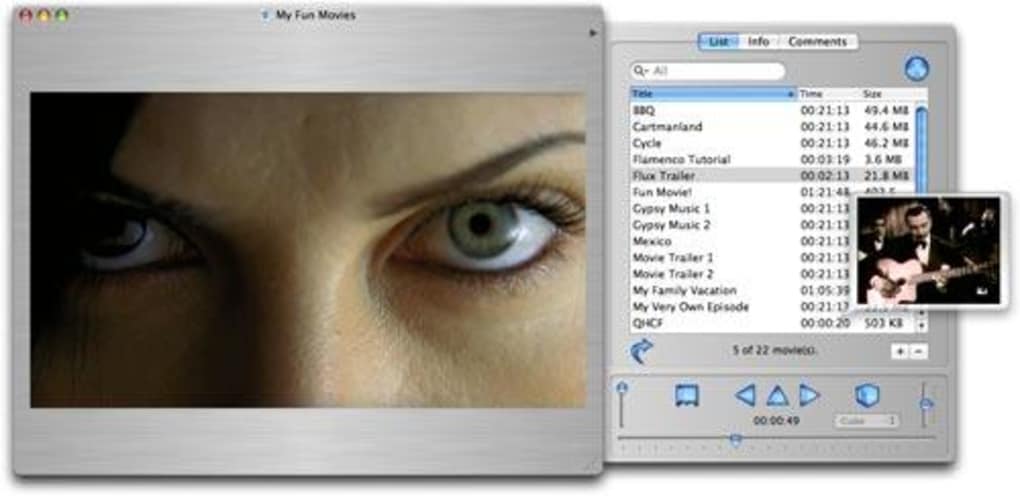
- Intuitive Cataloging: Drag‑and‑drop movie files or enter details manually, with fields for title, director, cast, genre, release year, and personal notes.
- Multi‑Language Support: Interface available in English, French, and Italian, making it accessible to a broader audience.
- Search & Filter: Real‑time search bar and advanced filters let you locate any film in seconds, even in large collections.
- Custom Tags & Ratings: Assign your own tags, star ratings, and watch‑status flags (watched, to‑watch, favorite).
- Export Options: Export your catalog to CSV or XML for backup, sharing, or importing into other media managers.
- Lightweight Design: Requires far less disk space than typical productivity suites, ideal for older Macs.
- Secure Offline Mode: No internet connection required; all data is stored locally on your machine.
- Regular Updates (Historical): Although the last update was in 2006, the software remains stable on supported macOS versions.
These features combine to make MovieHouse a practical choice for users who need a no‑frills solution for managing their movie collections. The application’s focus on essential cataloging tools means you won’t be distracted by unnecessary streaming integrations or cloud sync requirements. Instead, you get a clean, purpose‑built environment where each movie entry is just a click away. The ability to export data also future‑proofs your library, ensuring you can migrate to newer tools if your needs evolve.
Installation, Usage Instructions, and Compatibility
Installing MovieHouse on your Mac is a straightforward process that can be completed in just a few minutes. Follow these steps to get the program up and running:
- Download the Installer: Click the “Download MovieHouse” button below to obtain the .dmg file. The download is free for the trial version.
- Open the Disk Image: Double‑click the downloaded .dmg file to mount the installer volume.
- Drag to Applications: Drag the MovieHouse icon into your Applications folder. macOS may prompt you for your administrator password.
- Launch the App: Navigate to Applications → MovieHouse and double‑click to start the program. The first launch may request permission to access your Documents folder; grant it so the app can read and write catalog files.
- Activate Trial: On first run, a dialog will appear offering the 30‑day trial. No credit‑card information is required; simply click “Start Trial”.
Compatibility: MovieHouse runs on macOS 10.2 (Jaguar) through macOS 10.4 (Tiger). While it was originally built for classic Mac OS X, it continues to function on legacy hardware that cannot support modern 64‑bit applications. Users with newer macOS versions may need to run the app in compatibility mode or consider a virtual machine with an older OS for optimal performance.
Once installed, adding movies to your library is as simple as dragging a file onto the main window or using the “Add New Title” button. Fill in the metadata fields, select appropriate tags, and click “Save”. The catalog updates instantly, and you can begin sorting or searching right away. Because the software stores data locally, you can back up the entire MovieHouse folder (found in ~/Library/Application Support/MovieHouse) to an external drive for added security.
Pros and Cons – Quick Verdict
Pros
- Extremely low system resource usage, perfect for older Macs.
- Clear, uncluttered interface that focuses on cataloging.
- Multi‑language UI expands accessibility.
- Offline operation guarantees privacy and no bandwidth consumption.
- Export functionality safeguards your data for future migrations.
Cons
- Last software update was in 2006; may lack modern macOS compatibility.
- No built‑in media playback; you need external players.
- Trial version does not include premium support.
- Limited to macOS; no Windows, Android, or iOS versions available.
- Feature set is basic compared to full‑scale media managers.
In summary, MovieHouse shines when you need a simple, space‑saving cataloging tool for a Mac‑centric movie collection. Its strengths lie in ease of use, low overhead, and the ability to work entirely offline. However, users looking for integrated streaming, automatic metadata fetching, or cross‑platform support may find the application too limited. We recommend MovieHouse for collectors who value control over their data and prefer a minimalist approach to library management.
FAQ – Frequently Asked Questions
Is MovieHouse still safe to download in 2025?
Yes. The installer is hosted on a reputable software archive and the program does not contain any network components that could expose your system. As always, download from the official link provided in this review.
Can I import data from other cataloging apps?
MovieHouse supports CSV and XML import, so you can export your library from most other tools in one of those formats and then use the “Import” feature within MovieHouse to bring the data in.
What happens when the trial period ends?
After 30 days the application will prompt you to purchase a license key. Without activation, you can still view your catalog but cannot add new entries or export data.
Does MovieHouse support automatic metadata fetching from online databases?
No. MovieHouse is deliberately offline‑first. You must enter or edit metadata manually, which ensures privacy but requires a bit more effort.
Can I run MovieHouse on macOS Big Sur or later?
Officially the software supports up to macOS Tiger (10.4). Users on newer systems can try running it in a virtual machine with an older macOS version or use compatibility settings, but full native support is not guaranteed.
Conclusion – Should You Download MovieHouse?
If you own a Mac that runs an older version of macOS and you need a straightforward, low‑impact way to keep track of your movie collection, MovieHouse remains a solid choice. Its trial version offers all essential cataloging features without demanding a high‑end GPU or constant internet access. While the lack of recent updates and the absence of built‑in playback limit its appeal for power users, the program excels in simplicity, privacy, and speed. Click the button below to start your free download, explore the trial, and decide whether the minimalist approach matches your movie‑management style.







